Table of Contents
How to create alerts when your garage door is open with the IO-Linc and the Garage Door Kit
There are several options for alerting you when your garage door is open. The intent of this page is to show you those options.
How to create an email or SMS alert if a garage door is left open at night
Level Of Difficulty: Moderate
This wiki is intended to enable the I/O Linc Garage Door Kit and Indigo to provide an email or SMS alert when a garage door is left open past a certain time at night.
In this example, Indigo will check the garage door state at 11 PM every night. If the door is open, it will send an alert email or SMS (via an email to SMS gateway).
- Install the I/O Linc Garage Door Kit following the included instructions. Be sure to connect the green and black wires from the magnetic switch to the I/O Linc. The red wire does not connect to anything.
- Add the I/O Linc as a new device in Indigo:
- Choose
DEVICEfrom the left column in the Home Window - Click
New - Name the device Garage Door
- Select
Define and syncand enter the device Insteon address thenStartWhen the define and sync finishes, selectClose - Choose
Edit Module Settings_and select only the following options (clickUpload Settingsafter you change them)ge them):Update Indigo's internal Device input sensor stateMomentary mode for output relay (relay will only close for a few seconds)Automatically read relay state 4 seconds after it is toggled.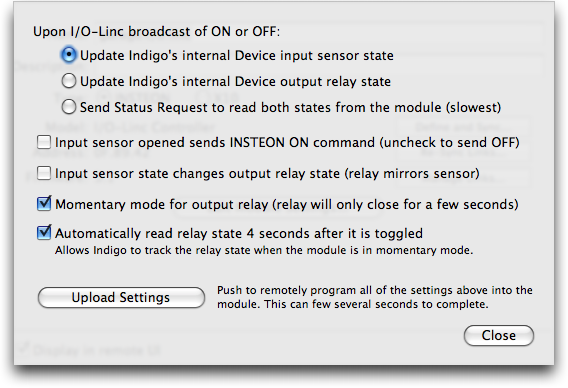
- Verify that when the garage door is closed, the bottom of the Garage Door device window shows
Binary Inputs: 1and that when the garage door is open,Binary Inputs: 0. NOTE: in newer versions of the Garage Door kit, the sensor has been replaced with one that reverses this. So, if the instructions that came with your Garage Door Kit say that the status light should be OFF when the door is closed, then you'll need to reverse the ON/OFF selections below. - Create a new variable.
- Go
Window:Variable ListorCmd-9. - Select
New - Name the new variable isGarageDoorOpen.
- Make sure your garage door is closed.
- Give the variable the initial value false.
- Create a Trigger Action:
- Choose
TRIGGERSfrom the left column in the Home Window - Click
New - Trigger Tab: Name: Garage Door is closed Type:
Device State ChangedDevice:Garage Door Binary Input 1 Becomes On (or Off if reversed) - Condition Tab:
Always - Actions Tab: Type:
Modify VariableVariable:isGarageDoorOpenSet to false
- Create a Trigger Action:
- Choose
TRIGGERSfrom the left column in the Home Window - Click
New - Trigger Tab: Name:Garage Door is open Type:
Device State ChangedDevice:Garage Door Binary Input 1 Becomes Off (or On if reversed) - Condition Tab:
Always - Actions Tab: Type:
Modify VariableVariable:isGarageDoorOpen Set to true
- Create a Schedule:
- Choose
Schedulesfrom the left column in the Home Window - Click
New - Schedule Tab: Name: Garage Door Open 11 PM Alert Time: 11:00 PM Date: Every 1 days
- Condition Tab: If variable
isGarageDoorOpen is true - Actions Tab: Type:
Send EmailTo your email address or SMS gateway address (can specify multiple addresses separated by commas). Subject: “Garage Door Status”, Message: “The garage door is open!”
Good luck! 
How to create an email or SMS alert if your garage door is open longer than 30 minutes
If you are forgetful and/or absentminded like me, sometimes you just forget to close the garage door. This can be a problem if you leave your house and leave the door open - you may find that you're missing some stuff when you return! So I cooked up this little solution that will email you or SMS (via the email-SMS bridge that your cell provider supplies) if the door is open for longer than 30 minutes (or whatever length of time you choose). This solution assumes you have a correctly installed I/O-Linc with a garage door kit, named “Garage Door” (see steps 1-2 of the How-to above).
- Select
Trigger Action Listfrom theViewmenu. - Click on the
New…button to create a new trigger - In the
Create New Trigger Actiondialog, name the trigger “Garage Door Opened” - Select
Device State Changedfrom theType:popup - Select
Garage Doorfrom theDevice:menu - Select
Binary Input 1from the next popup menu - Select
Becomes Off (or On if reversed)from the last popup menu - Select the
Actionstab - Select
Server Actions→Script and File Actions→Execute Scriptfrom theType:popup - Select
Pythonfrom theEmbeddedpopup - Copy the following script into the large script text box just under the
Embedded:radio button:dev = indigo.devices[IOLINCID] # "IO Linc" if not dev.states["binaryInput1"]: indigo.server.sendEmailTo("ADDRESSHERE", subject="The garage door is OPEN!!") - Select the
Delay bycheckbox and enter the number of minutes you want it to wait before sending the email/SMS - Select the
Override previous delaycheckbox - Click the
OKbutton
That's it. Now, whenever the garage door opens, it automatically creates a delayed action, and when that action fires, it runs the script that checks to see if the garage door is still open and if it is, it sends out the email.